
Designing a Basement Home Office for Professional Video Calls

Conflicting plans are not inevitable in remodeling. They result from fragmented structure.
Anthony Slabaugh Remodeling & Design provides design-build home renovation services for homeowners in Hudson, Akron & surrounding areas who value architectural alignment and disciplined execution.
A basement home office can be an excellent place for focused work, but video calls add another layer of planning. The room needs to look professional on camera, feel comfortable during long meetings, and support lighting, acoustics, technology, and privacy without feeling staged or overly formal.
The best basement office design considers what the camera sees, how light hits the face and screen, where cords and equipment are hidden, and how the office feels when it is not being used for calls.
At
Anthony Slabaugh Remodeling & Design, we help homeowners in Hudson, Akron and surrounding areas design basement home offices that feel refined, functional, and connected to the rest of the finished lower level.
Start With the Camera View
A video-call-ready office should begin with the camera background. The wall behind the desk matters because it becomes part of the homeowner’s professional presentation.
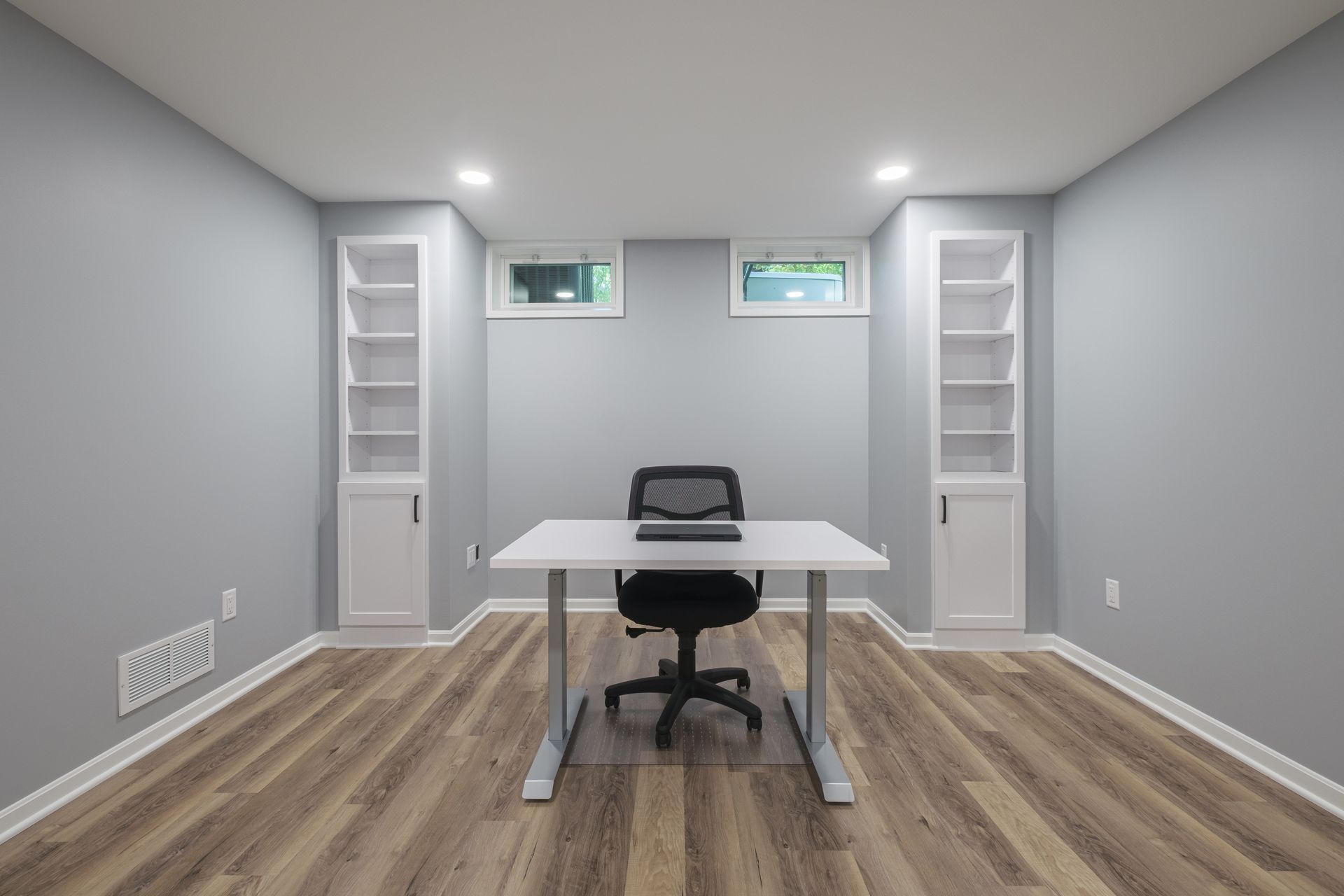
A blank wall can feel unfinished. A cluttered shelf can feel distracting. A custom built-in background, clean wall paneling, restrained shelving, cabinetry, or a balanced art wall can create a polished look without feeling artificial.
For homeowners throughout Bath, Fairlawn, and Chagrin Falls, this is where a basement office can feel especially intentional. The workspace can be private and practical while still presenting well on camera.a
Plan Desk Placement Carefully
Desk placement affects the camera angle, lighting, privacy, and daily comfort. A desk placed directly under harsh overhead lighting may create shadows. A desk facing a window may create glare. A desk with the door behind it may make the space feel less private during calls.
The strongest layout usually places the desk where the homeowner has a clean background, controlled lighting, and enough room for monitors, task lighting, storage, and movement.
At
Anthony Slabaugh Remodeling & Design, desk placement is reviewed with room layout, electrical needs, built-ins, and lighting before finishes are finalized.
Use Lighting That Works on Camera
Video call lighting should be flattering and glare-conscious. A single overhead fixture often creates shadows and does not support a professional appearance on camera.
A better plan may include recessed lighting, task lighting, wall lighting, and softer light near the desk. Window placement should also be considered so natural light helps the room without washing out the screen or creating glare.
The goal is not studio lighting. It is balanced, comfortable lighting that works for both calls and daily office use.
Design a Built-In Background With Restraint
Office built-in backgrounds can make a basement workspace feel polished, but they should be designed carefully. Too many open shelves, accessories, or display items can become distracting on video.
Closed cabinets, a few open shelves, integrated lighting, clean trim, and coordinated finishes can create a professional look while still providing storage. Built-ins can also hide office supplies, files, routers, chargers, and equipment.
A refined office background should support credibility without drawing attention away from the conversation.
Basement Video Call Office Planning Guide
| Design Detail | Why It Matters |
|---|---|
| Camera background | Creates a polished, distraction-free video presence |
| Desk placement | Affects lighting, privacy, camera angle, and comfort |
| Built-ins | Adds storage while creating a professional backdrop |
| Lighting layers | Reduces shadows, glare, and screen discomfort |
| Acoustic privacy | Helps calls sound clearer and feel more private |
| Cord management | Keeps technology organized and out of view |
This table is useful because video-call performance depends on layout, lighting, background, technology, and sound working together.
Include Acoustic Privacy
This blog focuses on video-call performance, but sound still matters. Basement offices may be near media rooms, gyms, family spaces, mechanical systems, or activity above.
Acoustic privacy can be improved through room placement, door selection, wall planning, ceiling details, flooring, and soft furnishings. The goal is to reduce distractions so calls feel more professional and focused.
Sound planning should happen before the room is finished, not after the first meeting reveals the problem.
Hide Technology and Cords
A professional office can quickly feel cluttered if cords, chargers, routers, printers, and accessories are visible on camera. Built-in desk storage, cable channels, concealed outlets, printer cabinets, and charging drawers can help keep the workspace clean.
Electrical planning is especially important. Outlets, data needs, task lighting, and equipment locations should be coordinated before cabinetry and walls are completed.
Visit Our Design Studio in Stow, Ohio
Our Stow, Ohio design studio gives homeowners a place to review cabinetry, lighting, finishes, hardware, built-in storage, and layout ideas together. Seeing these selections in context helps clarify how a basement office can support professional video calls and daily work.
Client Feedback on Our Remodeling Process
Homeowners often share that early planning helps them feel more confident about specialized spaces like home offices. By reviewing desk placement, camera backgrounds, lighting, acoustic privacy, storage, and technology needs together, Anthony Slabaugh Remodeling & Design helps clients make decisions with clarity instead of pressure.
Frequently Asked Questions
How do you design a basement office for video calls?
Start with desk placement, camera background, lighting, acoustic privacy, and cord management. The office should look professional on camera while still functioning comfortably for daily work, storage, and long meetings.
What makes a good video call background in a home office?
A good video call background is clean, balanced, and not distracting. Built-ins, closed cabinets, restrained shelving, wall paneling, or simple artwork can create a polished look without making the office feel overly staged.
What lighting is best for basement office video calls?
Layered lighting works best. Recessed lighting, task lighting, wall lighting, and controlled natural light can reduce shadows and glare. The goal is comfortable lighting that supports both camera quality and everyday work.
Can built-ins help a basement office look more professional?
Yes, built-ins can create a refined background while hiding cords, files, printers, chargers, and office supplies. When planned with lighting and camera angles, they make the workspace feel polished without adding visual clutter.
Start With a Basement Office Designed for Professional Work
A refined basement office should support video calls, lighting, storage, privacy, and technology without feeling disconnected from the home. Schedule a consultation with Anthony Slabaugh Remodeling & Design or call (330) 940-3237 to plan your basement home office remodel with confidence.
Recent Posts
Share this article
CLIENT REVIEWS
Don’t Just Take Our Word For It
See below how our customers react on our ultimate pressure cleaning services