
Hiding the Tech: Cord Management and Printer Storage in a Custom Office

Conflicting plans are not inevitable in remodeling. They result from fragmented structure. 


Anthony Slabaugh Remodeling & Design provides design-build home renovation services for homeowners in Hudson, Akron & surrounding areas who value architectural alignment and disciplined execution. 


If you are planning a renovation and want drawings that translate directly into construction without conflict, begin with a unified design-build model designed to eliminate misalignment before it begins.

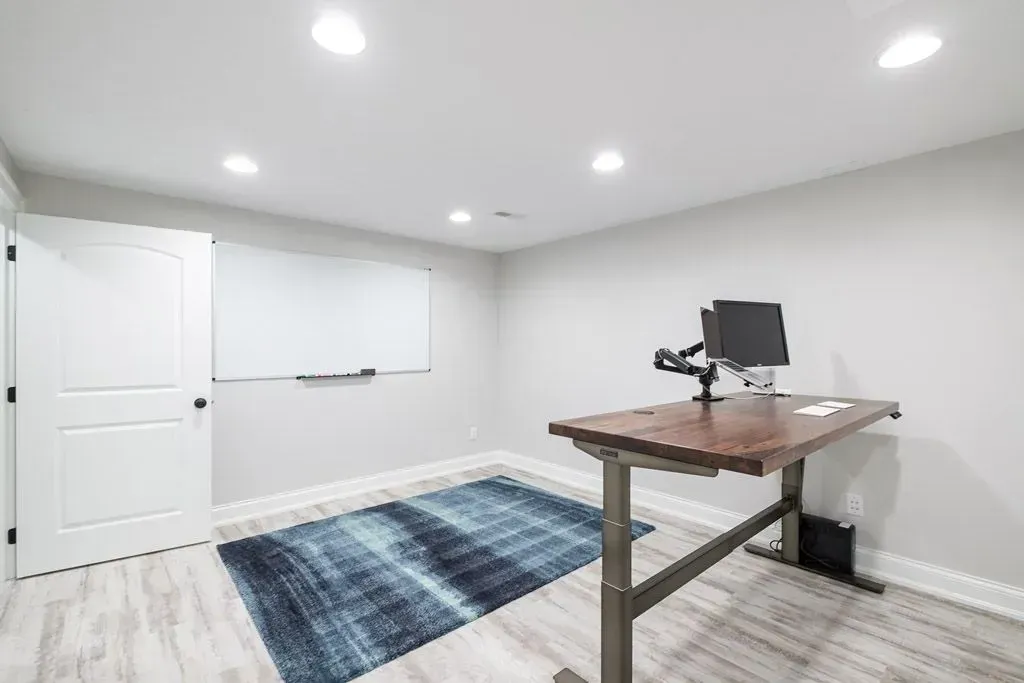
A basement office can feel focused and refined, but visible cords, printers, chargers, routers, monitors, and office supplies can quickly make the room feel cluttered. Technology is necessary for daily work, but it should not dominate the design.


A custom built-in desk can help organize the equipment that makes a home office function while keeping the workspace visually clean. With thoughtful cabinetry, outlet placement, printer storage, and cord management, a basement office can feel polished enough for professional work and comfortable enough for daily use.


At Anthony Slabaugh Remodeling & Design, we help homeowners in Hudson, Akron and surrounding areas design basement home office remodels with storage, technology, lighting, and finish details planned from the beginning.

Start With the Equipment You Actually Use  

Before designing built-ins, identify what needs to be stored, charged, plugged in, hidden, or accessed every day. A basement office may need space for monitors, laptops, desktop towers, docking stations, printers, scanners, routers, chargers, paper, files, lighting, speakers, and video-call equipment.


The best home office storage is specific to the way the homeowner works. A printer used every day should be easy to reach. A router may need airflow and access. Chargers should be convenient but not spread across the desktop.


For homeowners throughout Bath, Fairlawn, and Chagrin Falls, this early planning helps the office feel custom rather than improvised.

Design the Desk Around Clean Work Surfaces 

A custom built-in desk should support work without becoming a place where everything collects. Surface space matters, but so does what happens below, behind, and beside the desk.


Drawers can hold daily supplies. Cabinets can hide equipment. Open shelving can be used with restraint. A printer storage cabinet can keep larger technology accessible without leaving it exposed in the room.


At Anthony Slabaugh Remodeling & Design, built-ins are planned around real work habits, not just wall dimensions.

Plan Cord Management Before Cabinetry Is Built  

Cord management should never be an afterthought. Once cabinetry, walls, and work surfaces are installed, hiding wires becomes much harder.


A refined basement office may include concealed outlets, wire pathways, grommets, charging drawers, hidden power strips, and access panels. These details help support monitors, lamps, computers, printers, and chargers without leaving cords visible across the floor or desktop.


The result is a workspace that looks calm and works efficiently.

Create Printer Storage That Still Functions  

A printer storage cabinet should hide equipment without making it difficult to use. Printers often need clearance for paper trays, scanning lids, power cords, ventilation, and access for maintenance.


The cabinet should be designed around the actual printer size and how often it is used. A pull-out shelf, nearby paper storage, and a concealed outlet can make the setup easier to use.


Good storage hides the printer visually without making everyday work inconvenient.

Custom Basement Office Built-In Guide  

Built-In Detail Why It Matters
Concealed outlets Keeps power access close without visual clutter
Printer cabinet Hides equipment while keeping it usable
Charging drawer Organizes phones, tablets, and small devices
File storage Keeps paperwork accessible and contained
Cable pathways Prevents cords from crossing desks or floors
Closed cabinetry Hides supplies, routers, and office equipment

This table is useful because a custom office built-in should support technology, storage, and a clean finished look at the same time.

Hide Routers and Equipment Carefully  

Routers, modems, and network equipment are often placed wherever they fit, but that can create visual clutter or access problems. If these items are part of the office, they should be planned into the cabinetry carefully.


Equipment may need ventilation, signal consideration, service access, and nearby power. A closed cabinet may look cleaner, but the design should not create overheating or usability issues.


This is why technology planning should happen before the millwork is finalized.

Balance Open Shelves and Closed Storage  

Open shelves can make a basement office feel styled and personal, but too much open storage can become visually busy. Closed cabinets, drawers, and doors are often better for files, electronics, extra supplies, and items that do not need to be displayed.


A balanced design may include a clean desk surface, closed base cabinets, a few open shelves, and a polished background for video calls.


The goal is an executive office feel without stiffness or clutter.

Coordinate Built-Ins With the Room Design  

Basement office built-ins should feel like part of the architecture. Cabinet color, countertop material, hardware, wall color, lighting, trim, and flooring should all work together.


This matters especially in a finished basement where the office may connect to media rooms, family areas, or guest spaces. The office should feel focused, but not disconnected from the rest of the lower level.

Visit Our Design Studio in Stow, Ohio

Our Stow, Ohio design studio gives homeowners a place to review cabinetry, hardware, counters, lighting, finishes, storage options, and layout ideas together. Seeing these details in context helps clarify how a custom built-in desk can support technology without cluttering the office.

Client Feedback on Our Remodeling Process

Homeowners often share that early planning helps them feel more confident about detailed spaces like custom offices. By reviewing built-ins, cord management, printer storage, lighting, outlets, and finish coordination together, Anthony Slabaugh Remodeling & Design helps clients make decisions with clarity instead of pressure.

Frequently Asked Questions    

  • What should a custom built-in desk include?

    A custom built-in desk should include enough work surface, drawers, outlet access, storage for supplies, and planning for technology. Depending on the office, it may also include printer storage, charging drawers, file cabinets, shelving, and cord management.

  • How do you hide cords in a home office desk?

    Cord management can include concealed outlets, wire pathways, grommets, charging drawers, hidden power strips, and access panels. These details should be planned before cabinetry is built so cords do not run across the desk or floor.

  • Can a printer be hidden in a cabinet?

    Yes, a printer can be hidden in a cabinet when the design allows for clearance, ventilation, paper access, power, and maintenance. A pull-out shelf or dedicated printer cabinet can keep equipment accessible while reducing visual clutter.

  • Are basement office built-ins worth planning during a remodel?

    Yes, built-ins are most effective when planned during the remodel. Cabinetry, outlets, lighting, technology, storage, and finishes can be coordinated from the beginning, creating a cleaner and more functional basement office.

Start With a Custom Office That Keeps Technology Under Control  

A refined basement office should support technology, storage, and daily work without visible clutter. Schedule a consultation with Anthony Slabaugh Remodeling & Design or call (330) 940-3237 to plan your basement home office remodel with confidence.

Recent Posts

Basement Egress Window Installation Process | ASRD
By Anthony Slabaugh Remodeling & Design June 23, 2026
Learn what happens during basement egress window installation, from excavation and foundation cutting to drainage, waterproofing, and finish integration.
Basement Bedroom Natural Light With Egress Windows | ASRD
By Anthony Slabaugh Remodeling & Design June 23, 2026
Learn how an egress window can improve basement bedroom natural light, comfort, ventilation, and livability in Hudson, Akron and surrounding areas.
Basement Egress Window Well and Drainage Planning | ASRD
By Anthony Slabaugh Remodeling & Design June 23, 2026
Learn how basement egress window wells, drainage, grading, and moisture planning support safer, more comfortable lower-level bedrooms.
Basement Bedroom Egress Window Guide for Homeowners | ASRD
By Anthony Slabaugh Remodeling & Design June 23, 2026
Learn when a basement bedroom egress window is needed, how it supports safety, and what homeowners should consider before planning a lower-level bedroom.
Basement Egress Window Installation Process | ASRD
By Anthony Slabaugh Remodeling & Design June 23, 2026
Learn what happens during basement egress window installation, from excavation and foundation cutting to drainage, waterproofing, and finish integration.
Basement Bedroom Natural Light With Egress Windows | ASRD
By Anthony Slabaugh Remodeling & Design June 23, 2026
Learn how an egress window can improve basement bedroom natural light, comfort, ventilation, and livability in Hudson, Akron and surrounding areas.
Basement Egress Window Well and Drainage Planning | ASRD
By Anthony Slabaugh Remodeling & Design June 23, 2026
Learn how basement egress window wells, drainage, grading, and moisture planning support safer, more comfortable lower-level bedrooms.

Share this article

CLIENT REVIEWS

Don’t Just Take Our Word For It

See below how our customers react on our ultimate pressure cleaning services